Less inbox.More headspace.
Your email, calendar, and AI agent. One calm place to move work forward.
Zimt MailZIMT MAIL

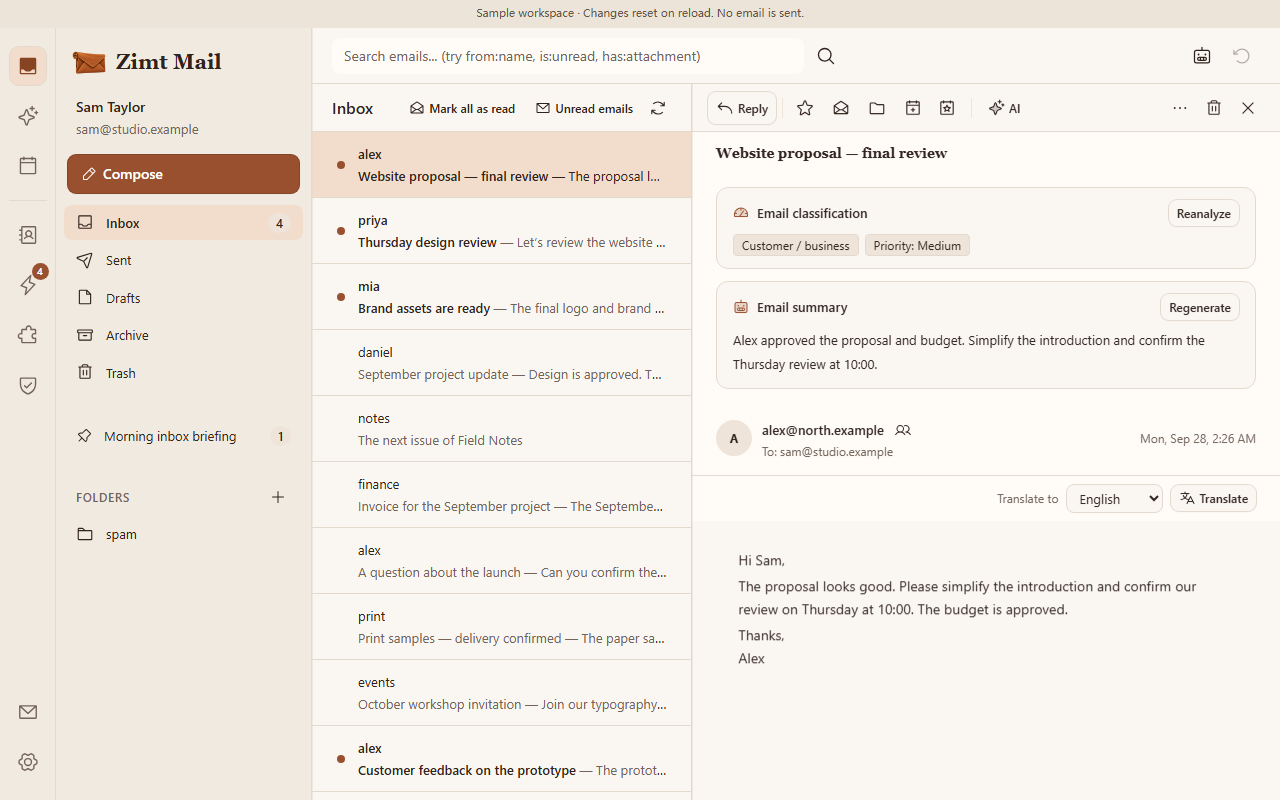
Know what matters, sooner.
Turn a crowded inbox into a clear picture. See the summary and priority, then open the original message for every detail.
- Summaries with source emails
- Priority and categories
- Search across conversations
Email & AI, connected
Zimt MailEmail · Calendar · Contacts- Gmail
- Outlook
- IMAP / SMTP
- Cloudflare
- OpenAI
- DeepSeek
- Jev
- MiMo
- MCP




Available services depend on configuration. Brand names indicate compatibility, not endorsement.
Good to know
06 / ZIMT MAIL
01Can I keep my current email address?
Yes. Your administrator can connect Gmail, Outlook or another compatible mailbox. Available methods depend on your provider and service configuration.
02What does the AI assistant actually do?
It can help summarize messages, search conversations and prepare drafts. You can review the source email and edit any draft before sending.
03Will AI send messages on its own?
Interactive AI prepares drafts; sending requires your explicit action. Scheduled tasks require confirmation before they run.
04What can I try in the demo?
Explore sample email, AI replies, calendar, contacts, automation, Skills and approvals. The demo uses prepared data, resets on reload and sends no email.
05Where is my data stored?
We host your dedicated service on Cloudflare. Customer data stays separate, and content needed for AI features is processed by the selected model provider.
06How do I begin?
Sign in to your mailbox to read email. Sign in to the management platform to manage your service and instance, or register there with an invitation code.