Review before sending
Agents prepare drafts. Sending requires an explicit action; scheduled tasks start with a proposal for approval.
Your email, calendar, and AI agent. One calm place to move work forward.
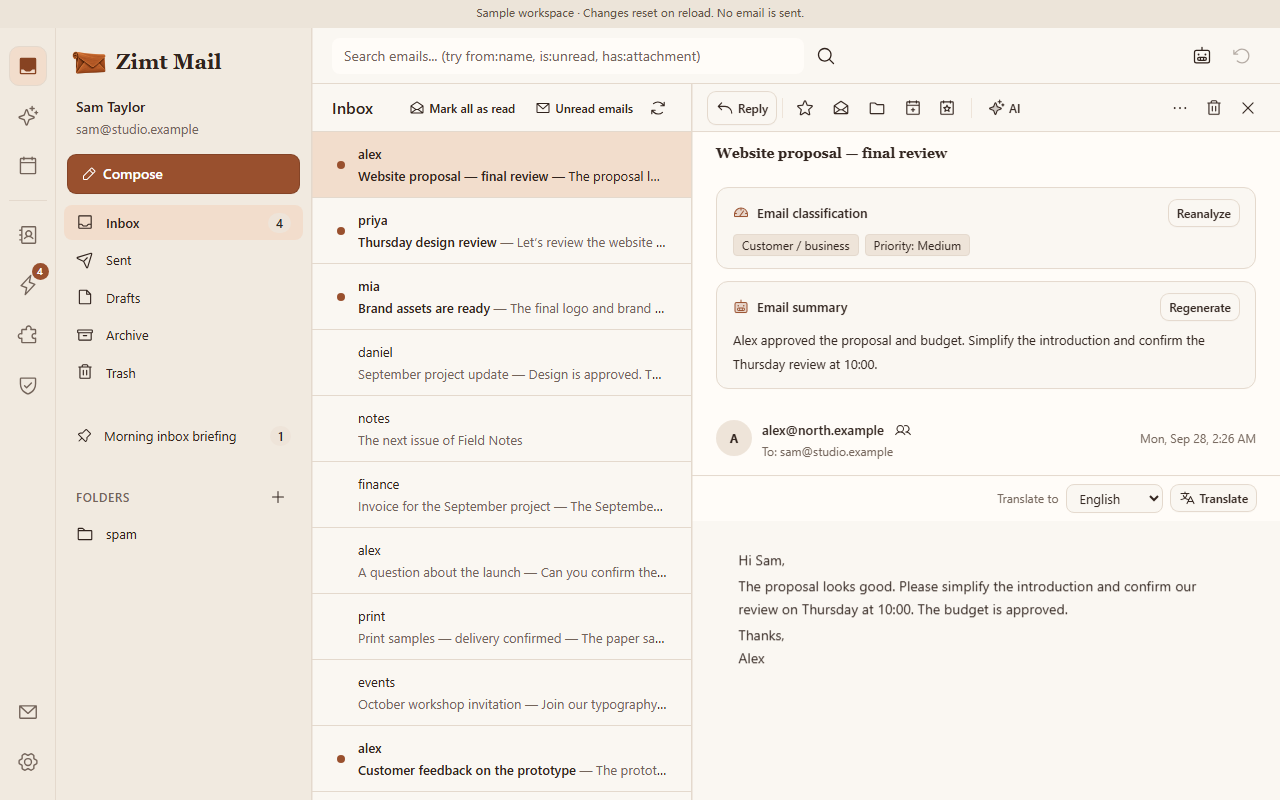
Read the summary, category and priority. Open the original email whenever you need the detail.
Gmail, Outlook or your own mail server.

Gmail and Outlook require provider configuration. IMAP/SMTP is available for compatible mail servers.
Choose your model provider. Connect other AI tools through MCP.
Agents prepare drafts. Sending requires an explicit action; scheduled tasks start with a proposal for approval.
Run Zimt Mail in your own deployment, with separate Mailbox storage and attachments in R2.
Choose AI features, model providers and MCP permissions for each Mailbox.
The demo uses Zimt Mail’s product interface with sample emails. Open and search messages, star an email, edit a draft, try the AI assistant, browse the calendar and contacts, and try automations, Skills, approvals and saved memories. AI replies are prepared examples. Changes stay in your browser until you reload. Sending, account configuration and external services require the full product.
Yes. An administrator can connect a compatible mailbox using IMAP/SMTP or configured Gmail and Outlook integrations. The available method depends on your provider and deployment.
Interactive Agents prepare drafts. Sending needs an explicit action. Scheduled tasks require confirmation before they can run, within the permissions you approve.
English, Simplified Chinese, Traditional Chinese and German. The website and product use the same four languages.
In your Cloudflare deployment, with Mailbox storage and R2 for attachments. Content needed for AI features is processed by the model provider you configure.
Use Open mailbox to sign in with an existing account. An administrator configures new deployments and creates Mailboxes. Self-service registration and subscriptions are not available yet.